

I just launched AI Agent System Design for Product Managers, a half-day workshop focused on building a strong understanding of foundational agent topics. Our first session is on May 8th - learn more here!
Tool calling is an essential step in building AI agents. It allows the LLM to request information or take an action completely autonomously. There’s only one downside - every time you use a tool, the results load into the context window, taking up space and degrading the quality of future tool use.
This post will walk you through programmatic tool calling, a technique where a model writes code that orchestrates tool calls rather than the calls itself. You’ll understand why it can outperform standard tool calling by up to 20%, how both Anthropic and Cloudflare have shipped production implementations, and when it’s worth the added complexity.
Let’s dive in!
The Problem With Standard Tool Calling
Ai agents all work the same way: the model requests a tool call, your server executes it, the result enters the context window (the model’s working memory for the current task). The model then reasons about what to do next, and the cycle repeats for each step. For any complex task, this often means 50+ tool calls per user request.
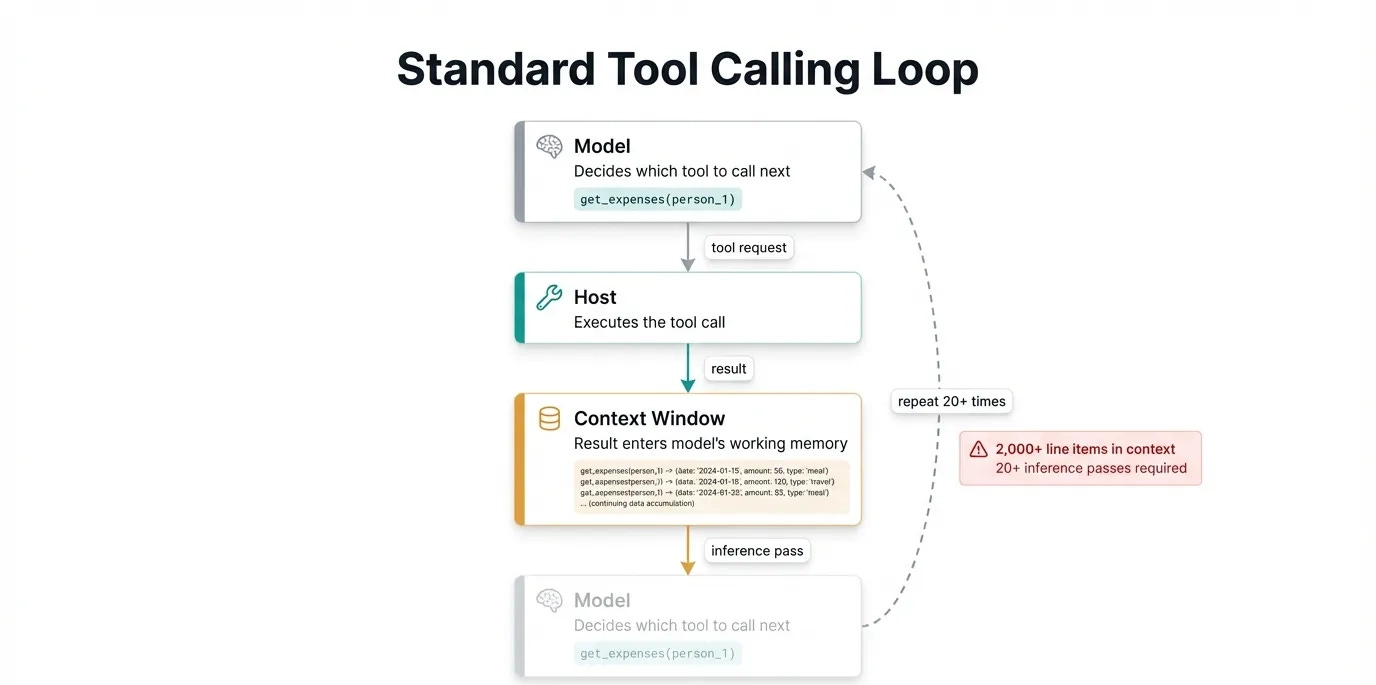
For example, let’s say we had an agent for managing our team’s expenses. The goal of the agent is to report back who has exceeded their budget for the month.
The model would start by calling get_team_members(), then calls get_expenses() for each person. It would then calculate each person’s budget one at a time, and finally return the list of people who exceeded the budget. All of this information has to sit in the context window, likely overwhelming the available memory and causing the agent to fail.
All the intermediate data (the list of members and their expenses) the agent stored in its context window was only useful for calculating the end result. This is where programmatic tool calling can help.
Why Code Beats Tool Calls
LLMs are much better at writing code than any other capability, including tool calling. A team at University of Illinois Urbana-Champaign first noticed this in 2024 with their paper CodeAct. Instead of having an agent call tools normally, they gave the agent a Python environment where it could write code. This code would call the tools instead, which means only the final result would enter the context window.
Results across 17 models on standard benchmarks showed up to 20% higher success rates compared to JSON and text-based tool calling, with fewer turns required to complete equivalent tasks.
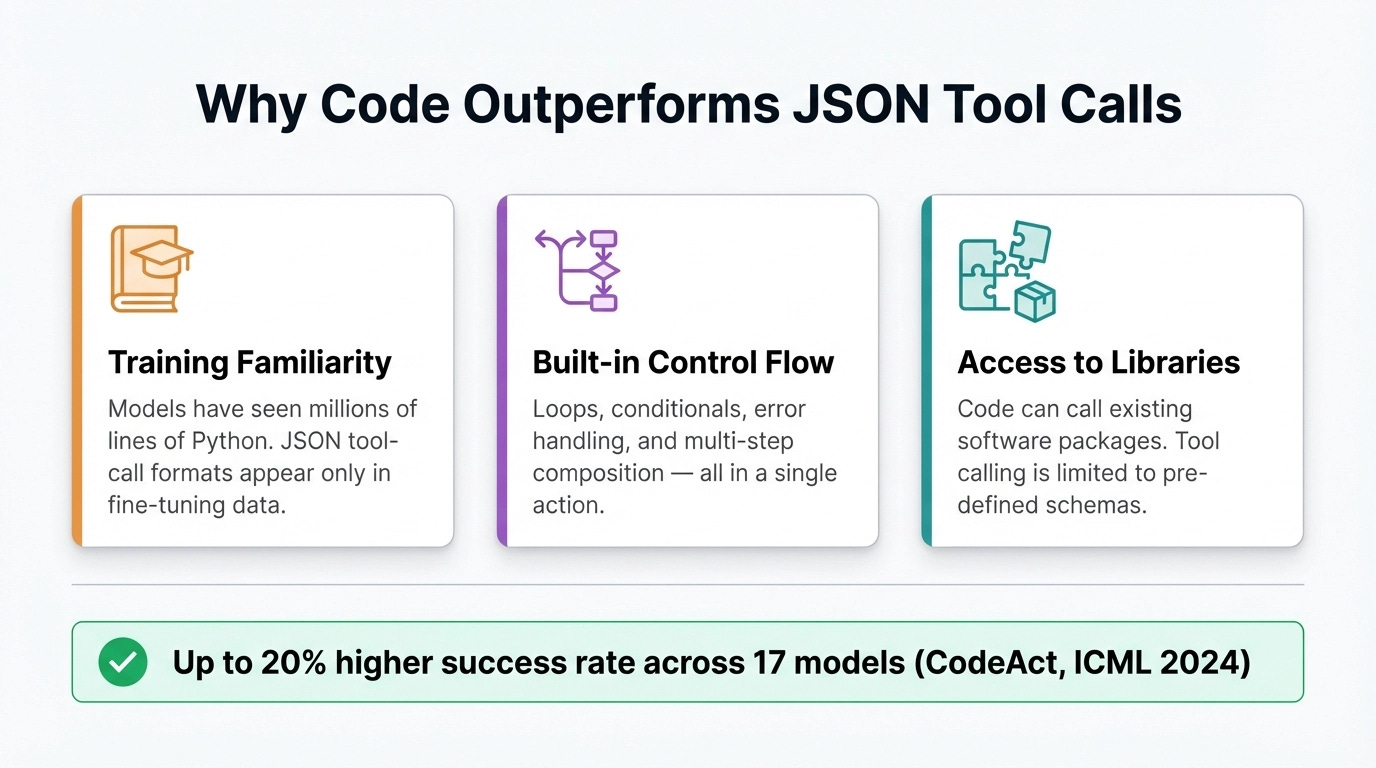
There are three main reasons why code outperforms regular tool calls:
Models have deep familiarity with coding from pre-training
Code has built-in control flow: loops, conditionals, and composition of multiple operations in a single action
Code can call existing libraries rather than being limited to pre-defined tool schemas
Also, when the generated code fails, the model can read the structured error output from the interpreter and revise the script.
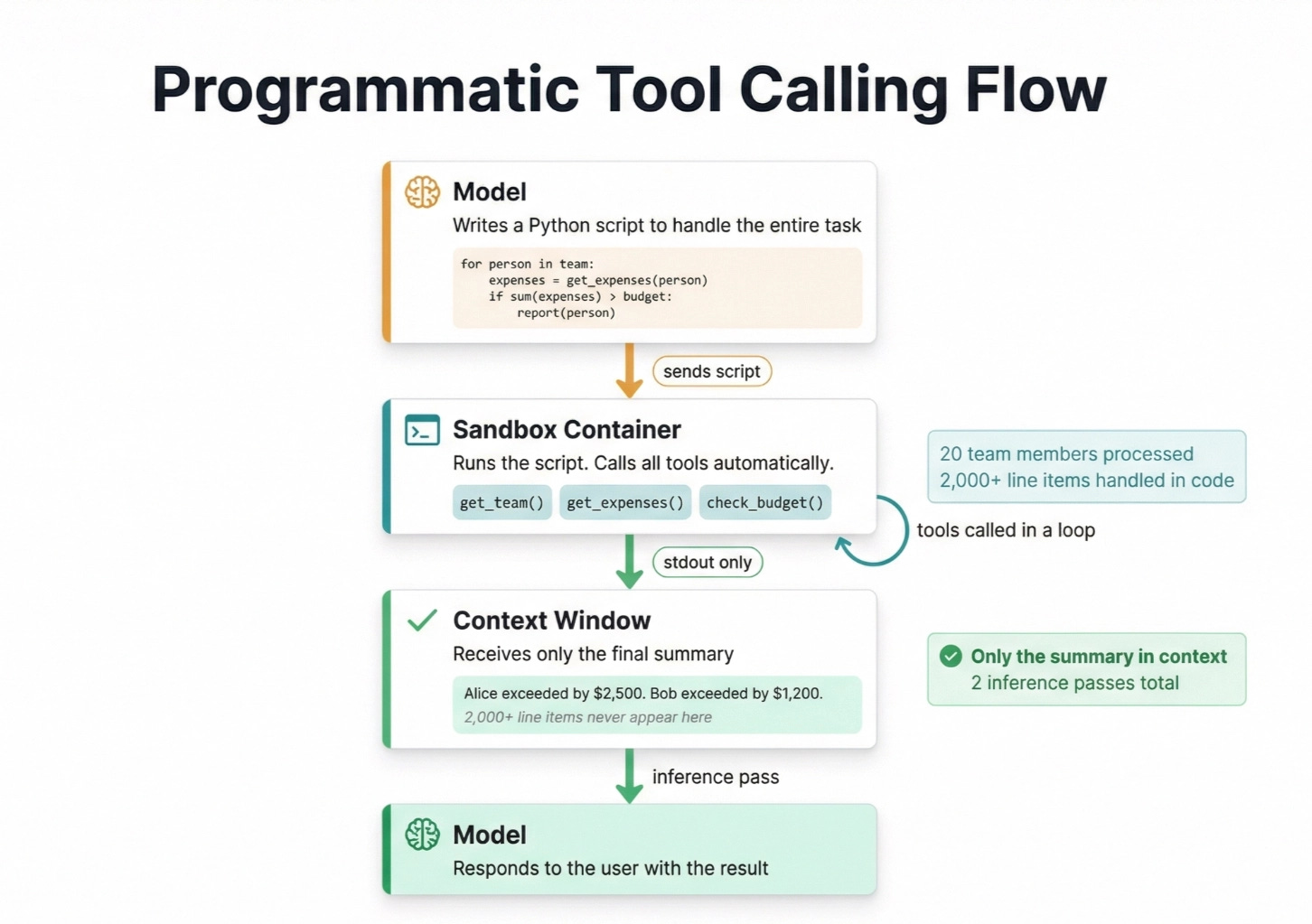
Let’s take another look at our expenses agent using programmatic tool calling. Instead of calling each tool on each employee, our agent would write a script that executes this for us. Remember that the agent is writing the code to use tools, the code runs, and the agent sees the result.
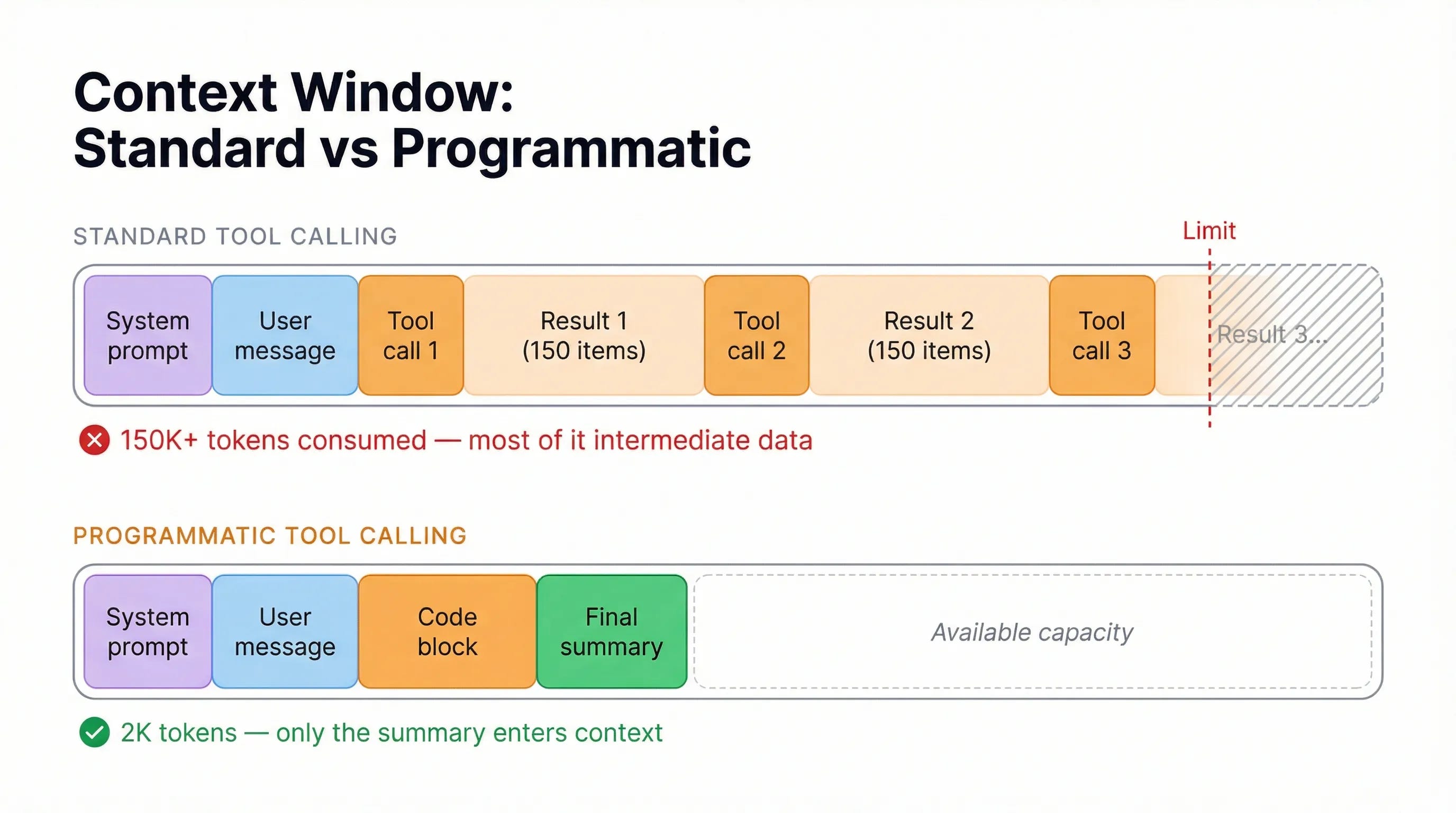
And finally, here’s what our context windows would look like between standard and programmatic tool calling:
The Two Major Implementations
Both Anthropic and Cloudflare shipped production implementations in 2025 and early 2026. They reach the same outcome through different architectural choices.
Anthropic: Programmatic Tool Calling
Anthropic released Programmatic Tool Calling in November 2025. The model writes Python that runs in a managed container. Your tools opt in by specifying allowed_callers: ["code_execution_20250825"] in their definition. The code runs inside the container, calls your tools as needed, and only the script’s output enters Claude’s context when it finishes.
Measured results on complex research tasks:
37% average token reduction (43,588 to 27,297 tokens)
Up to 98% reduction for workflows with large intermediate data (150K tokens to 2K)
Accuracy improvements on internal knowledge retrieval benchmarks (25.6% to 28.5%)
Anthropic released Programmatic Tool Calling alongside two related features worth knowing. Tool Search lets agents discover tool definitions on demand instead of loading all of them into context upfront (85% token reduction on MCP evaluations). Tool Use Examples lets you attach concrete usage demonstrations to each tool definition, improving accuracy from 72% to 90% on complex parameter handling. These three features together are Anthropic’s approach to scaling tool use without linearly scaling context costs.
One practical note: Anthropic recommends assigning each tool to either direct calling or programmatic calling, not both. The model performs better with unambiguous guidance about how each tool should be called.
Cloudflare: Code Mode
Cloudflare built the same pattern independently, calling it Code Mode. The model writes TypeScript instead of Python, and the code runs in lightweight sandboxed JavaScript environments rather than containers.
When the model decides to act, it writes a function like sendEmail:
async () => {
  const weather = await codemode.getWeather({ location: "London" });
  if (weather.includes("sunny")) {
    await codemode.sendEmail({ to: "team@example.com", subject: "Nice day!" });
  }
};
When to Use It
Programmatic tool calling can make your agent workflow more complex. Because the agent doesn’t see context in between steps, it won’t have any knowledge of what happened during that time. With any highly interactive and contextual use cases, this can make the agent feel slow and forgetful.
Use cases that work better are those that require reading in a lot of information to reach some final conclusion, and do not require the ability to chat with each individual data element. Other good use cases include handling a large number of tools, or restricting what data the model can see.
Let’s try two common agents: a coding agent and a data analysis agent.
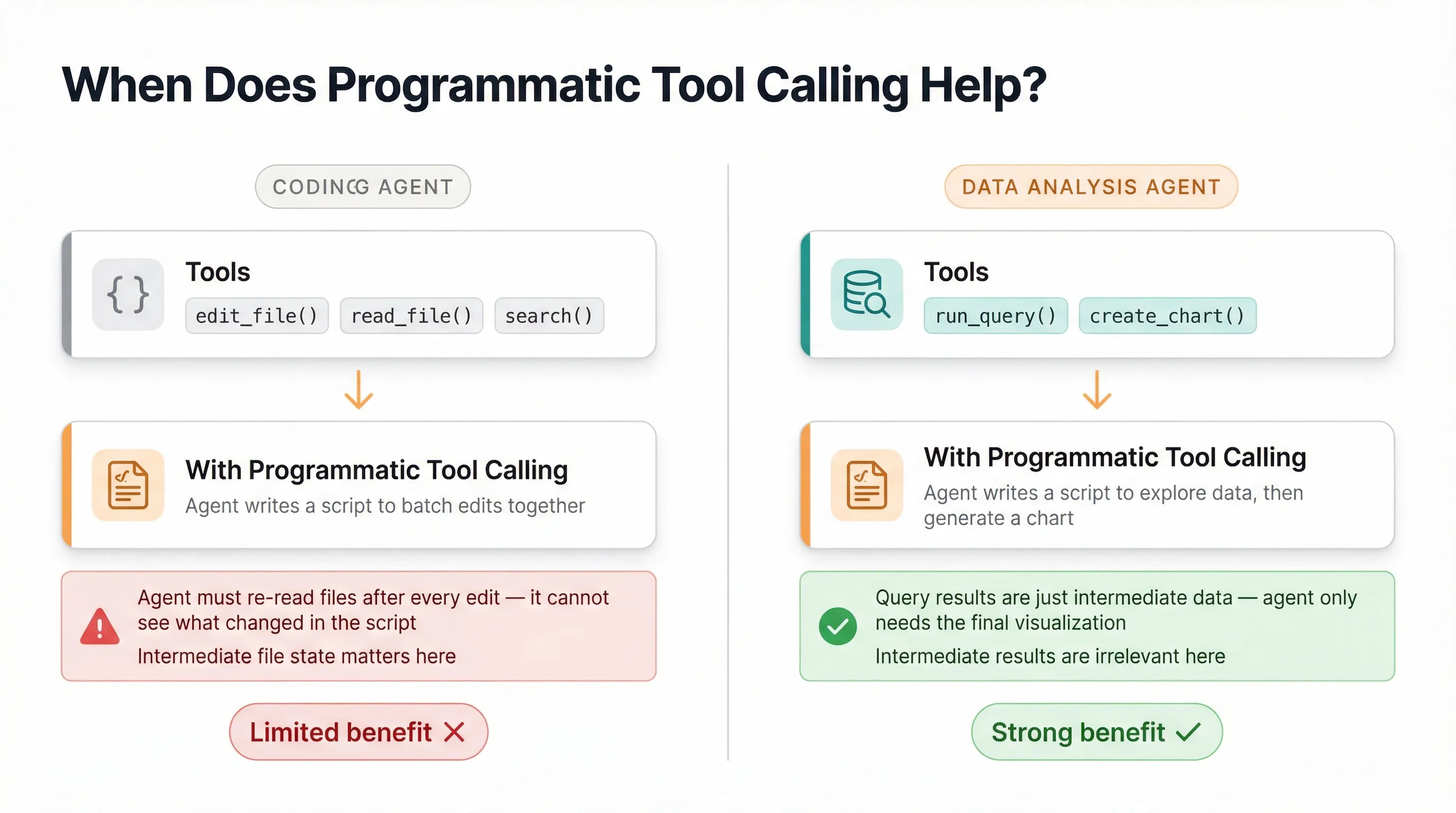
With a coding agent, typical tools would include edit_file, read_file, and search. If we use programmatic tool calling, the coding agent would write a python script that would attempt to batch these reading and updating together. This could save on context window usage, but the agent would be required to reread files after every edit, as it would’t see the edit tool call results.
With a data analysis agent, we might have tools like run_query and create_chart. Based on the user’s question, the agent would run one or more queries and produce a visualization. Here programmatic tool calling would save a lot of time and tokens, as the intermediate query results themselves may not be important.
If most results in your workflow are just inputs to the next step and don’t need the model to reason about them directly, you have a strong case for programmatic tool calling.
Programmatic tool calling is not an often discussed topic, so I hope this helps you understand what it is, how it works, and when you should use it!
awesome explanation here. really clear and it made sense. thanks!